Shift Scheduling Software for UK Teams
Create schedules, assign workers to locations, and compare planned hours against actual GPS-verified attendance. Privacy-first timesheet software that verifies attendance at clock-in and clock-out only — no live GPS tracking.
Privacy-First Time Tracking
Our system is UK GDPR-aligned. We verify on-site presence with a GPS check only at the moment of clock-in and clock-out. We never track live location or movement history, ensuring employee privacy is protected.
Stop Wasting Time on Manual Rota Planning
Spreadsheets and paper rotas are inefficient, hard to update, and disconnected from actual hours worked. Geo Time Tracker brings your scheduling and time tracking together.
Reduce Admin Overhead
Create schedules with date ranges, times, and multi-worker assignment in one form. Workers are notified automatically via push notification.
Automatic Conflict Detection
The system checks for overlapping shifts before creation — including overnight shifts that cross midnight. No double-booking.
Scheduled vs. Actual Hours
Each shift shows scheduled duration alongside actual worked time from GPS-verified clock-ins. See the difference at a glance on the shift detail page.
From Schedule to Payroll in 4 Steps
Create a Schedule
Set the date range, start/end times, and select locations. Assign one or more workers. The system generates individual shifts automatically.
Workers Get Notified
Assigned workers receive push notifications and can see their upcoming shifts in the mobile app or web dashboard.
Clock In On-Site
Workers clock in at the scheduled location. GPS coordinates and distance from the geofence are recorded for every check event.
Approve & Export
Managers review completed shifts, approve timesheets, and export approved hours to Sage, BrightPay, QuickBooks, or generic CSV.
Scheduling Features Built for Efficiency
Everything you need to manage your team's schedule and verify their attendance accurately.
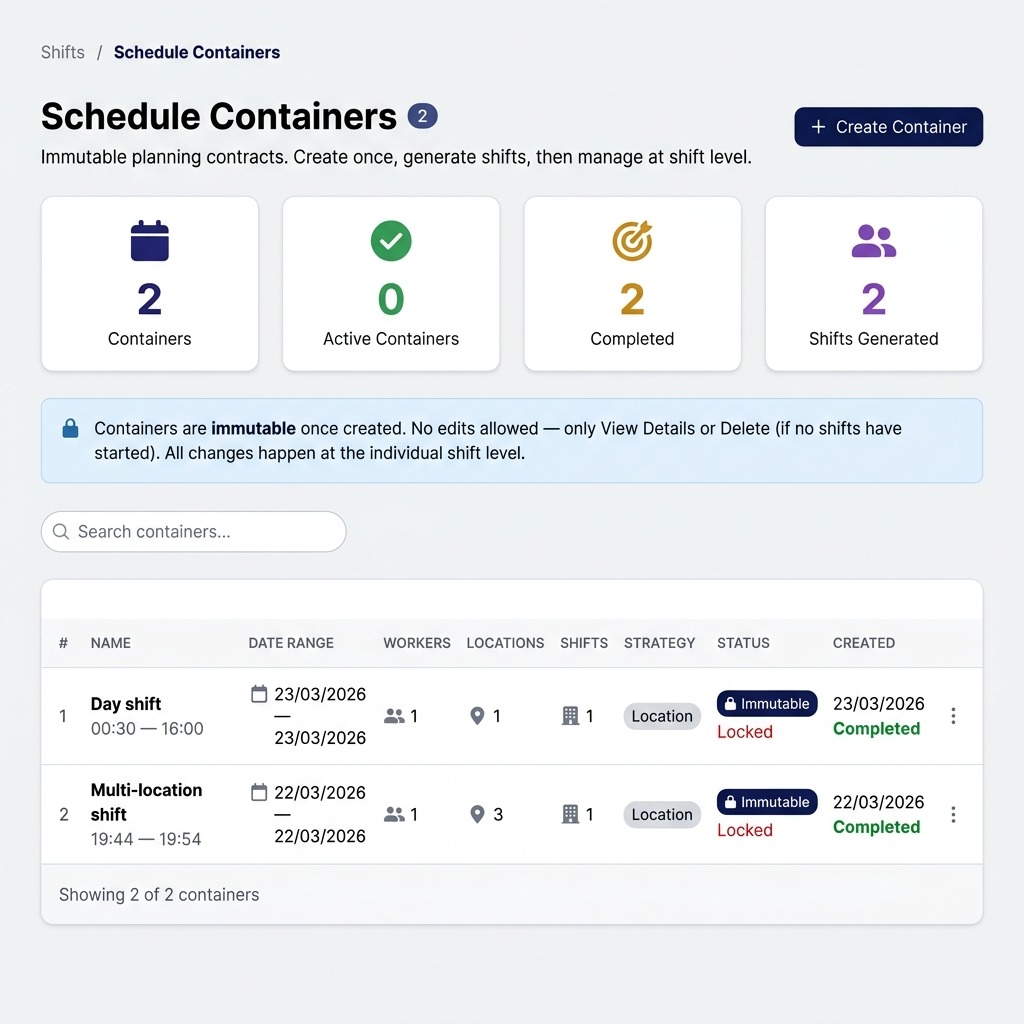
Schedule Containers
Create immutable schedule containers with date ranges, times, locations, and workers. Individual shifts are generated automatically and managed at the shift level.
Location-Linked Shifts
Assign shifts to specific work locations. GPS verification at clock-in records the distance from the geofence and flags out-of-range events.
Notifications & Reminders
Workers receive push notifications when assigned to a new schedule. Shift reminders fire 60 minutes before start time to reduce no-shows.
Conflict Detection
Time-range overlap checks prevent double-booking workers. Overnight shifts that cross midnight are handled correctly with adjacent-day detection.
Approval Workflow
Completed shifts enter a pending approval state. Managers approve or reject with a reason. Workers are notified of the outcome via push notification.
Night Shift Support
Create overnight schedules (e.g. 22:00–06:00) with a dedicated night shift toggle. Conflict detection handles cross-midnight time ranges correctly.
Scheduling for Any UK Workforce
Simple pricing for teams of any size. All plans include scheduling with conflict detection.
Construction & Site Teams
Schedule crews across multiple sites with geofence verification at each location.Field Services & Maintenance
Schedule daily or weekly shifts for engineers across client locations with GPS-verified attendance.Facilities & Security
Manage shift rotas for cleaning, security, or maintenance staff working across a portfolio of locations.UK GDPR Compliance by Design
Geo Time Tracker is designed for UK businesses and follows UK GDPR data-minimisation principles.
Customer data is hosted in the United Kingdom (London region – LON1) on DigitalOcean infrastructure.
Location data is processed only at the moment a user actively clocks in or clocks out, solely to verify presence within an approved work location.
The platform does not provide continuous GPS tracking, live location monitoring, or movement history.
Managers can access attendance records and approved timesheets but cannot view live maps or employee movements.
Audit log retention varies by plan tier (30, 90, or 180 days). Payroll export snapshots are retained for the duration of the subscription.
Shift Scheduling FAQs
Yes. Each shift shows both the scheduled duration and the actual worked duration from GPS-verified clock-ins. The shift detail page displays both values side by side, and the performance page tracks attendance and punctuality trends over time.
The check-in is recorded and the distance from site is logged. The event is flagged as out-of-range and visible to managers on the shift detail page. Managers can review flagged events and decide how to handle them.
Yes. When creating a schedule, toggle "Night Shift" for shifts that cross midnight (e.g. 22:00–06:00). The system validates that the end time is before the start time, handles duration calculation correctly, and extends conflict detection to check adjacent days.
Yes. Workers can submit change requests for scheduled or in-progress shifts — either "Can't attend" or "Need different hours" with requested times. Managers review and approve or reject with a reason. Workers are notified of the outcome.
Approved shifts feed into the payroll summary. Export hours to Sage, BrightPay, QuickBooks, or generic CSV. Each export is stored as an immutable snapshot. GTT provides time data — your payroll system handles pay calculations.
Streamline Your Shift Scheduling Today
Get a free demo and discover how our rota software can save you time, reduce errors, and improve payroll accuracy. Pricing is simple and transparent.